
Most lists for promo emails secretly rank ESPs. This one ranks the design layer — the tool that builds the email itself, then exports clean HTML into whichever sender you already pay for.
A promotional email lives or dies on three things. It has to win the Gmail Promotions tab preview before anyone opens it. It has to hit hard with one clear offer the moment it does open. And it has to render the same on iPhone, Outlook, and dark mode — because a discount badge that disappears in dark mode is a discount that didn't happen.
Every "best builder for promotional emails" article on Google quietly answers a different question. They rank email service providers — Mailchimp, GetResponse, Klaviyo, Brevo — and treat the design tool as a bundled afterthought. That works if you only ever send through one ESP. It fails the moment you need to design a clean promo and push it into a Shopify Email flow, a HubSpot workflow, and a transactional SendGrid template at the same time.
This guide ranks the design layer separately. Eight tools, three failure modes (Gmail Promotions tab loss, Outlook/dark-mode breakage, dirty ESP export), and one transparent scoring framework. The bundled ESP+builder picks still get covered — labeled clearly as the all-in-one option they are — but the question being answered here is: which tool actually builds the promotional email.
What makes an email builder good for promotional emails
Promotional emails are not newsletters with a discount badge slapped on top. They behave differently in the inbox, fail differently in clients, and demand specific blocks that informational emails don't need. A good promotional builder is judged on three criteria.
1. It earns the Gmail Promotions tab preview
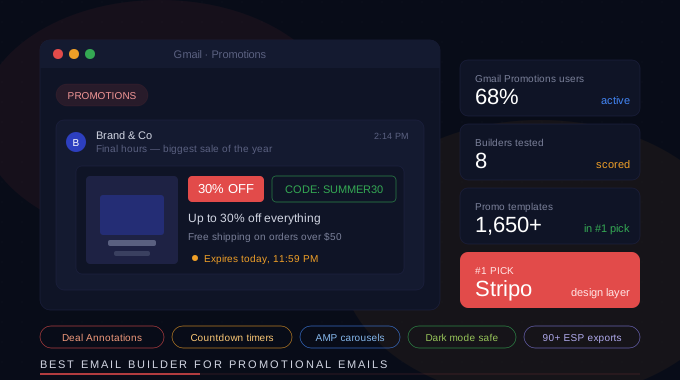
Roughly 68% of Gmail users actively use the Promotions tab and 45% check it daily. The Promotions tab is no longer the email graveyard people called it in 2015 — it's a dedicated commerce surface with its own visual currency: Deal Annotations (discount %, promo code, expiration date) and Product Carousels (up to 10 product images that float at the top of the tab). Google's developer documentation specifies the exact schema.org markup. The question for a builder is whether it lets you ship clean HTML with that markup intact, or whether the editor mangles structured data on export.
2. It survives the three rendering killers
Promotional emails amplify every rendering bug because they rely on visual punch — gradients, bold colors, big CTAs, image-heavy hero sections. Outlook flattens CSS gradients and ignores rounded corners on buttons unless you ship VML fallbacks. Dark mode in iOS Mail inverts red discount badges into murky pink. iPhone Mail clips wide CTAs and crushes line height on hero copy. A builder worth picking gives you per-client previews and ships MSO conditional comments + dark-mode meta tags by default, not as a paid add-on.
3. It exports clean HTML to your ESP
The design layer is not the sending layer. Most promo campaigns get sent from Klaviyo, HubSpot, Mailchimp, Salesforce Marketing Cloud, or a custom transactional setup. A builder that locks your designs inside its own send environment is fine until you switch ESPs. A builder that exports clean, ESP-ready HTML — or syncs natively to 80+ sending tools — survives every platform migration. This is the criterion most lists ignore entirely.
|
The honest framing If you only ever send through one platform, an all-in-one ESP+builder bundle (Mailchimp, Brevo, Constant Contact) is fine. The moment you send through two or more, or you have a brand designer producing emails that engineering then pushes into an ESP, you need a separate design layer. That's what this article ranks first. |
Scoring methodology
Each tool was scored on five axes. Scores reflect how well the builder handles the actual promotional email job — not general feature counts.
-
Promo template depth — number and quality of promotional templates (sale, BFCM, flash, seasonal, abandoned cart, product launch). Stock template count alone doesn't qualify; rendering quality and customization range do.
-
Gmail Promotions tab support — whether the builder ships HTML compatible with Deal Annotations and Product Carousels. AI-friendly structured markup (Google switched to AI extraction in 2025) gets bonus weight.
-
Interactive blocks — countdown timers, AMP carousels, product feeds, dynamic content, gamification. Promotional emails benefit more from these than any other category.
-
Cross-client rendering — Outlook fallback handling, dark mode tested, iPhone Mail compatibility, preview tools built in.
-
Export + ESP fit — clean HTML export, direct integrations with the ESPs most promo campaigns ship from, API access for programmatic generation.
The 8 builders, scored
Scores out of 5 per axis. The total column reflects all-around suitability for promotional email production, not raw feature count.
|
Tool |
Promo templates |
Gmail Promo tab |
Interactivity |
Best for |
|---|---|---|---|---|
|
Stripo |
5 / 5 |
5 / 5 |
5 / 5 |
Brand designers + multi-ESP teams |
|
GetResponse |
4 / 5 |
5 / 5 |
3 / 5 |
Annotations-first solo senders |
|
Klaviyo |
4 / 5 |
3 / 5 |
3 / 5 |
Ecommerce promo flows |
|
Beefree |
4 / 5 |
2 / 5 |
3 / 5 |
Free standalone design tool |
|
Mailchimp |
3 / 5 |
2 / 5 |
2 / 5 |
Solo founders, all-in-one |
|
Brevo |
3 / 5 |
2 / 5 |
3 / 5 |
Budget builder + sender combo |
|
MailerLite |
3 / 5 |
2 / 5 |
2 / 5 |
Simple, clean promos at low volume |
|
Moosend |
3 / 5 |
2 / 5 |
3 / 5 |
Affordable automation + design |
|
How the Stripo row earned the top spot Stripo is the only entry that's a pure design layer — no sending, no contact list, no automation engine. It scores highest on promo template depth (1,650+ templates including a dedicated promotional category), ships HTML compatible with both Gmail Deal Annotations and Product Carousels, and exports natively to 90+ ESPs. The other entries are sending platforms with builders attached — useful, but a different category. |
The 8 builders ranked
1. Stripo — best overall for promotional emails
Best for: Designers, agencies, and teams sending promotional emails through more than one ESP. Anyone whose workflow looks like: design once, push to Klaviyo for ecommerce + HubSpot for B2B + transactional sender for receipts.
Pricing: Free plan with limited templates and exports. Paid plans start around $15/month for unlimited templates and exports, scaling to team and white-label tiers.
Stripo is the email design tool that won the SERP without being an ESP. It ships 1,650+ HTML templates with a deep promotional category (BFCM, flash sales, seasonal, product launches, abandoned cart recovery), a true drag-and-drop editor with HTML/CSS access, native AMP for Email support (in-email carousels, accordions, forms), built-in countdown timers, and reusable modules so you can save a header or a product card once and drop it into every promo afterwards. Every email exports as clean HTML or syncs natively to 90+ ESPs including Klaviyo, Mailchimp, HubSpot, Brevo, Salesforce Marketing Cloud, and SendGrid.
For the Gmail Promotions tab specifically, Stripo's HTML output preserves structured markup cleanly, which is exactly what Google's AI-driven annotation extraction needs as of 2025. The interactive AMP blocks open the door to product carousels and accordion-style FAQ blocks inside the email itself, which most all-in-one ESPs don't support at all.
Trade-offs: Stripo doesn't send emails. You need an ESP. If your entire workflow lives inside Mailchimp's editor and you never plan to leave, Stripo adds a step. For everyone else, that separation is the feature.
2. GetResponse — best annotations workflow for solo senders
Best for: Solo founders and small ecommerce stores who want Gmail Deal Annotations set up in a UI, not in raw schema markup.
Pricing: Free plan available with limited contacts. Paid plans from $19/month.
GetResponse is the only entry on this list with a fully built-out Gmail Promotions tab annotation workflow inside the campaign builder. You fill in the discount badge text, the promo code, the expiration date — it ships the structured markup for you. For a single-platform sender targeting ecommerce, that's a real shortcut. The template library covers most promo formats, drag-and-drop works fine, and a built-in funnel builder ties promo emails to landing pages.
Trade-offs: GetResponse is an ESP — your designs live inside it. Exporting clean HTML to another sender is friction. Interactive AMP support is limited. If you outgrow GetResponse, you re-build everything.
3. Klaviyo — best for ecommerce promotional flows
Best for: Shopify, BigCommerce, and WooCommerce stores running heavy promotional + transactional flows where the builder needs deep product-feed integration.
Pricing: Free up to 250 contacts. Paid plans scale with list size, starting around $20/month for 500 contacts.
Klaviyo's editor is designed around dynamic product blocks pulled live from the connected store. For ecommerce promo emails — abandoned cart, browse abandonment, back-in-stock, post-purchase — that integration is unmatched. Klaviyo's segmentation and predictive analytics make personalized discount codes per recipient easy.
Trade-offs: Klaviyo's promo template library is narrower than dedicated builders, and the editor itself is functional rather than design-led. Most agencies build promos in Stripo or Beefree and import the HTML into Klaviyo for sending. Klaviyo's Gmail Promotions tab annotation support is basic.
4. Beefree — best free standalone builder
Best for: Solo designers and freelancers who need a fast standalone drag-and-drop editor with clean HTML export and no sending platform attached.
Pricing: Free tier with full editor access. Paid plans from $25/month for team features, brand kits, and unlimited projects.
Beefree (formerly BEE) is the closest direct competitor to Stripo in the pure-design-layer category. Drag-and-drop is fast, the template library is solid (700+ templates), and HTML export is clean. The team plan adds collaboration and brand kits, which matters when multiple designers work on the same promotional calendar.
Trade-offs: Smaller template library than Stripo (700 vs 1,650+). No native AMP for Email support — interactive promo blocks and Gmail product carousels are out of reach. Fewer direct ESP integrations.
5. Mailchimp — best all-in-one for solo founders
Best for: Solo founders and small-team businesses who want builder, sender, list management, and basic automation in one tool — and never plan to leave.
Pricing: Free up to 500 contacts. Paid plans from $13/month for the Essentials tier, scaling with contact count.
Mailchimp is the default and there's a reason — it's a workable bundle. The editor produces respectable promo emails, the template library covers the common formats, and the contact management is straightforward. For a first-time email sender running a few promos per month, it's defensible.
Trade-offs: Mailchimp's editor is the most limited of any tool on this list. No AMP for Email. No interactive blocks. Outlook rendering is hit-or-miss without manual HTML tweaks. Pricing scales aggressively once your list grows. Many teams that started on Mailchimp now design in Stripo and export to a cheaper sender.
6. Brevo — best budget builder + sender combo
Best for: Budget-conscious senders who want builder + sending + SMS in one tool and don't need advanced promo features.
Pricing: Free plan with daily send limit. Paid plans from $9/month. Pricing scales by email volume, not contact count — generous for large lists with low send frequency.
Brevo (formerly Sendinblue) is the pricing-friendly all-in-one. The drag-and-drop editor handles standard promo templates, supports basic personalization, and the volume-based pricing model is genuinely cheaper for large lists. Transactional sending is bundled.
Trade-offs: Template library is smaller and visually dated. Interactive block support is minimal. No serious Gmail annotation tooling. The editor is functional rather than design-led.
7. MailerLite — best for simple clean promos at low volume
Best for: Creators, bloggers, and small ecommerce stores running clean minimal promotional emails — not loud BFCM banners.
Pricing: Free up to 1,000 subscribers and 12,000 emails/month. Paid plans from $10/month.
MailerLite is the design-first all-in-one. The editor is clean and produces minimal, modern promotional emails that work well for lifestyle brands, creators, and B2B SaaS. The free tier is generous — 1,000 subscribers is meaningful breathing room for a new sender.
Trade-offs: Template library is smaller and skews newsletter, not promo. Interactive elements limited. Best for senders whose promotional emails are restrained rather than visually loud.
8. Moosend — best for affordable automation + design
Best for: Small businesses that want pricing-friendly automation alongside a reasonable promotional builder.
Pricing: 30-day free trial. Paid plans from $9/month for 500 subscribers.
Moosend's editor is competent and the platform's selling point is generous automation features at a low price. Template library covers the main promo categories, and the analytics dashboard is one of the cleaner ones in this price tier.
Trade-offs: Smaller template library and minimal interactive block support. The editor is solid but not design-led. Less brand recognition means fewer agency integrations.
How to design a promotional email that converts
Picking the right builder is half the work. The other half is following the design rules promotional emails reward — and most newsletter-trained designers get wrong.
Rule 1: One offer, one CTA, no negotiation
The biggest unforced error in promotional emails is the multi-offer hero. "40% off + free shipping + new collection + last chance!" hands the reader four decisions at once. A promo email should have one offer at the top, one CTA, and the rest of the email is reinforcement. The CTA button should be impossible to miss above the fold on mobile.
Rule 2: The hero offer is the email
On mobile, the hero block (subject line preview + opening image + offer headline + CTA) is the entire email for 60-70% of recipients — they decide whether to click or scroll based on that block alone. The hero needs the discount percentage as the largest visible element, the headline as a one-sentence promise, and the CTA in a button color that doesn't disappear in dark mode.
|
Dark mode test Open every promotional email in dark mode before sending. A red CTA button on a white background flips to red on near-black in iOS Mail. If your discount badge is white text on red, dark mode users see it correctly. If it's black text on red, the contrast collapses. Test or lose conversions silently. |
Rule 3: Urgency without lying
Countdown timers work because they're true. "Sale ends in 4h 23m" with a live-ticking timer that actually counts down to the expiration creates real urgency. "Limited time offer!" with no expiration creates none. The builders that ship native countdown timer blocks (Stripo, GetResponse, Beefree paid tier) make this a 30-second add. The ones that don't push you into third-party services like Sendtric, which works but adds a dependency.
Rule 4: Gmail Promotions tab is half the battle
If you're a B2C sender, accept that your promotional emails land in the Promotions tab and design for it. That means: a deal annotation with the discount percentage and promo code in the inbox preview, a product carousel showing 3-5 hero items for ecommerce, and a brand logo (BIMI) that builds recognition before the email opens. The Promotions tab is no longer a graveyard — it's a commerce surface with its own visual currency.
|
Tactical Promotions tab setup Add discount_value (e.g. "30% OFF"), discount_code (e.g. "SUMMER30"), and end_date in ISO 8601 format to your email's schema.org markup. Google's AI extracts these into the inbox preview. Builders that produce clean structured HTML preserve these on export; builders that strip them silently break the annotation. |
Rule 5: The fold matters, but the second viewport matters more
If the recipient scrolls past the hero offer, they're qualified — they want more reasons to click. The second viewport should reinforce the offer with social proof (review snippets, customer counts, press logos), product visuals (carousel or grid), and one repeat CTA. Don't waste it on filler copy. Promo emails are short by design — anything over three viewports on mobile starts to feel like a website.
FAQ
What's the difference between an email builder and an ESP for promotional emails?
An email builder is the design layer — you create the email. An ESP (email service provider) is the sending layer — you store contacts and send the email. Some tools (Mailchimp, Brevo, GetResponse) bundle both. Some are pure builders (Stripo, Beefree) that export to an ESP. Pure builders are better when you send through multiple ESPs or need professional-grade design control.
Do I need AMP for Email for promotional campaigns?
Not strictly, but it's a real edge. AMP for Email lets recipients interact inside the email — browse a product carousel, fill a form, RSVP — without clicking through to a landing page. Gmail and Yahoo support it. For ecommerce and event promos, in-email product carousels routinely lift CTR by 20-40%. Stripo and a few others support AMP natively; most ESPs don't.
How important is the Gmail Promotions tab for B2C promotional emails?
Critical. Around 68% of Gmail users actively use the Promotions tab, and the inbox preview is now annotated with discount badges, promo codes, expiration dates, and product carousels. An email with full Deal Annotation markup gets dramatically higher visibility than a plain text preview competing in the same tab. If you're B2C and ignore the Promotions tab, you're leaving open rates on the table.
Can I use a free email builder for serious promotional campaigns?
Yes, with caveats. Stripo's free plan covers most needs for a brand sending a few promos per month. Beefree's free tier produces clean HTML you can paste into any ESP. Paid plans unlock unlimited templates, AMP support, advanced collaboration, and the bigger template libraries. For agencies or high-frequency senders, paid is worth it within the first month.
Why do my promotional emails look broken in Outlook?
Outlook uses Microsoft Word's rendering engine for HTML, which doesn't support CSS gradients, rounded button corners, or modern CSS properties like flexbox or grid. Promotional emails amplify the problem because they rely heavily on visual styling. The fix is to use builders that ship MSO conditional comments and VML fallbacks for buttons automatically. Stripo and Beefree do this by default. Mailchimp and Brevo expect you to test and patch manually.
Should I use a builder that's separate from my ESP, or just stick with my ESP's editor?
If you only send through one platform and the volume is low, stick with your ESP's editor — fewer moving parts. The moment you send through two or more ESPs, run high-frequency promo calendars, or need designer-grade output, switch to a separate design layer. Stripo, Beefree, and a few others are built exactly for that workflow.
Final thoughts
Promotional emails are the highest-stakes format in email marketing. Newsletters tolerate a missed CTA. Transactional emails tolerate a flat design. Promos do not — a discount that doesn't render in dark mode is a discount that didn't happen, and a Promotions tab preview that doesn't show the discount badge is an open rate you didn't earn.
The right builder for the job depends on whether the design and sending layers are bundled in your workflow. If you send through one platform forever, an all-in-one (Mailchimp, GetResponse, Brevo) keeps things simple. If you send through more than one — or you treat email design as a discipline rather than a checkbox — pick a pure design layer. Stripo leads that category by a comfortable margin for promo emails specifically, and the next-best alternative for a free standalone tool is Beefree.
The cheapest mistake is picking the wrong category. Don't compare Stripo to Mailchimp directly — they answer different questions. Compare Stripo to Beefree if you want a design layer. Compare Mailchimp to Brevo if you want a bundled ESP. The article you're reading exists because most of the internet conflates the two.


