
Gmail is the world's #1 email client with 29% market share — but it has its own unique quirks that break poorly built emails. We tested 8 builders specifically on Gmail rendering, 102KB output, Promotions tab annotation, AMP support, and Gmail plugin integration.
Choosing the best email builder for Gmail requires understanding what makes Gmail different from every other inbox. With 29% of all email opens happening in Gmail, it is the single most important client to get right — and yet most email builders treat Gmail support as a checkbox rather than a design discipline.
Gmail strips styles from the document head, clips emails over 102KB, has partial support for media queries, and ignores web fonts entirely. It also offers unique opportunities no other client provides: Promotions tab annotations that display images, discount badges, and expiry dates directly in the inbox, and native AMP for Email support for interactive content. Getting Gmail right means knowing both the constraints and the opportunities.
This guide compares eight leading email builders specifically on Gmail compatibility. Our #1 pick is Stripo — the only builder that addresses both Gmail's limitations and its unique features in a single platform.
Why Gmail email rendering is different from other clients
Gmail holds approximately 29% of the global email client market share, making it the most widely used email client in the world. Unlike Outlook — which uses the Word rendering engine — Gmail uses a modified version of the WebKit browser engine. This makes Gmail significantly more capable than Outlook, but it introduces its own set of specific constraints that designers and developers must account for.
The Gmail 102KB clipping threshold
The most critical Gmail-specific limitation is the 102KB HTML size threshold. Gmail clips any email whose HTML exceeds approximately 102KB, replacing the remainder of the email with a 'View entire message' link. Most recipients never click that link. The bottom of your email — including your unsubscribe link, legal footer, and final CTA — simply disappears for a significant portion of your audience.
This makes lean HTML output a primary evaluation criterion for any Gmail email builder. Builders that generate bloated, redundant HTML — even if it renders beautifully — create a systematic delivery failure for Gmail recipients.
|
How to check your email's HTML size Before every send, check the HTML file size of your exported email. In most email builders, export the HTML, open it in a text editor, and check the file size — it must be under 102KB. Stripo displays the HTML output size in the editor before export, flagging emails that approach or exceed the threshold. |
Gmail strips head and style block CSS
Gmail removes all CSS from the <head> section and from <style> blocks in the email body. Only CSS applied as inline style attributes on individual HTML elements is preserved. This is the same requirement as Outlook, but for a different reason — Gmail's security model strips external stylesheets to prevent tracking and malicious CSS.
The practical implication: any email builder for Gmail must auto-inline all CSS on export, converting stylesheet rules into element-level style attributes. Builders that rely on stylesheet-based styling will produce visually broken emails in Gmail.
Gmail and media queries
Gmail's support for CSS media queries has improved significantly in recent years — current Gmail on Android and iOS supports media queries, allowing responsive layouts to reflow correctly on mobile. However, Gmail on desktop (web) still has limited media query support. Builders that rely exclusively on media queries for mobile responsiveness — rather than fluid, percentage-based layouts — will produce fixed-width emails on desktop Gmail.
The most reliable approach for Gmail is a combination of fluid table-based layouts that adapt naturally to screen width, supplemented by media queries for fine-tuned mobile adjustments. Stripo's responsive templates use this hybrid approach by default.
Gmail and web fonts
Gmail does not support web fonts loaded via @font-face or Google Fonts in the email client. Custom fonts always fall back to system fonts — typically Arial, Helvetica, or Georgia. Builders that promise custom font support in email should be evaluated carefully: the font will display in Apple Mail and some other clients, but Gmail recipients will always see the fallback.
This is not a dealbreaker — it simply means font choices in Gmail emails should be made with the fallback stack in mind, not the primary font. A well-chosen fallback stack (Arial, Helvetica Neue, sans-serif) reads cleanly in Gmail and maintains the layout intent.
Gmail-specific email features: the opportunity most builders miss
Gmail is not just a constrained environment — it is also the only email client that offers features specifically designed to increase sender engagement. These features are almost entirely absent from competitor articles on this topic, which is precisely why covering them creates a competitive content advantage.
Gmail Promotions tab annotations
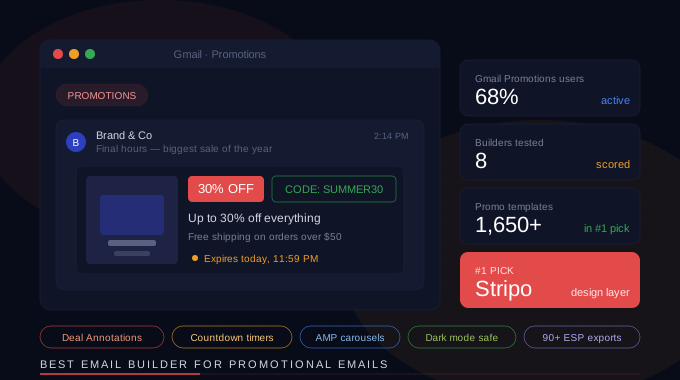
Gmail's Promotions tab displays a visual preview of promotional emails — including a hero image, a deal badge with discount percentage, an expiry countdown, and a promo code — before the recipient even opens the email. These annotations are defined by structured data markup embedded in the email's HTML, and they can dramatically increase open rates for promotional campaigns.
Stripo is one of the very few email builders that includes a dedicated Gmail Promotions tab annotation builder directly in its editor. You configure the annotation visually — selecting the image, setting the deal text, entering the expiry date — and Stripo generates the correct structured data markup automatically. This feature alone can provide a measurable lift in Gmail open rates for e-commerce and promotional campaigns.
|
Gmail Promotions tab annotation impact Emails with Promotions tab annotations — showing a thumbnail image and deal badge in the inbox — consistently outperform unannotated emails on Gmail open rates. The structured data that drives these annotations requires specific JSON-LD markup that most email builders do not generate. Stripo's annotation builder is the easiest way to implement this without writing code. |
Gmail AMP for Email
Gmail supports AMP for Email — a Google initiative that allows interactive content inside emails: carousels, accordions, live forms, real-time data that updates after the email is delivered, and add-to-cart functionality without leaving the inbox. Gmail was the first major email client to adopt AMP for Email and remains its primary deployment target.
Stripo is one of the only drag-and-drop email builders with native AMP for Email support. You can build AMP-powered interactive emails visually — without writing AMP markup by hand — and Stripo generates both an AMP version (for Gmail and supported clients) and a standard HTML fallback (for all other clients) in a single template.
Sending HTML emails directly from Gmail
Many teams — particularly in sales, outreach, and internal communications — want to send designed HTML emails directly from the Gmail compose window, not through a bulk sending platform. This is a fundamentally different workflow from marketing email campaigns, and it requires a builder with direct Gmail integration.
Stripo's Gmail plugin (available as a Chrome extension) allows you to design an email in Stripo, then inject it directly into the Gmail compose window with one click. The HTML is preserved exactly as designed — no reformatting, no copy-paste errors. For sales teams and individuals sending personalized designed emails from their own Gmail account, this is the cleanest workflow available.
Gmail dark mode
Gmail applies dark mode color transformations to emails when the recipient has dark mode enabled on their device. Unlike Outlook's dark mode (which is more aggressive and can invert colors unpredictably), Gmail's dark mode is relatively well-behaved — but it still requires that all content areas have explicit background color declarations to prevent transparent backgrounds from appearing dark.
Stripo's dark mode preview allows you to check how your email renders in Gmail dark mode directly from the editor, before export. This eliminates a common testing gap where emails look correct in light mode but display washed-out or invisible text in dark mode.
Best email builder for Gmail: comparison at a glance
Here is how the top eight email builders compare on Gmail-specific criteria. These are the features that determine whether your email renders correctly in the world's most-used inbox.
|
Tool |
Inline CSS |
<102KB output |
Promo tab |
AMP support |
Gmail plugin |
|
Stripo ★ #1 |
Auto-inlined |
Optimized + flag |
Built-in builder |
Native support |
Chrome extension |
|
Beefree |
Auto-inlined |
Generally lean |
No |
No |
No |
|
GMass |
Auto-inlined |
Lean by design |
No |
No |
Built into Gmail |
|
Canva |
Auto-inlined |
Can be heavy |
No |
No |
Export only |
|
Moosend |
Auto-inlined |
Generally lean |
No |
No |
No |
|
Unlayer |
Auto-inlined |
Lean (API) |
No |
No |
No |
|
Tabular |
Auto-inlined |
Lean output |
No |
No |
No |
|
Sequenzy |
Auto-inlined |
Generally lean |
No |
No |
Built for Gmail |
Stripo is the only builder in this comparison that offers Gmail Promotions tab annotation generation, native AMP for Email support, and a Gmail Chrome extension — all three of Gmail's unique differentiating features — alongside standard Gmail rendering compatibility.
Stripo: the best email builder for Gmail overall
Stripo leads this comparison because it is the only email builder that addresses Gmail not just as a rendering target, but as a feature-rich platform. While every builder in this list produces Gmail-compatible HTML, only Stripo exploits the full range of what Gmail uniquely offers.
Automatic inline CSS and lean HTML output
Stripo auto-inlines all CSS on export, converting every stylesheet rule into element-level style attributes. More importantly, Stripo's HTML output is optimized for size — the editor displays a real-time HTML file size indicator, and Stripo flags emails that approach the 102KB Gmail threshold before export. This is a genuinely useful safety net that prevents one of the most common and least visible Gmail delivery failures.
Gmail Promotions tab annotation builder
Stripo's Promotions tab annotation builder is a visual interface that generates the JSON-LD structured data markup Gmail uses to display deal previews in the Promotions tab. You select a hero image from your template, enter the deal description, set a discount percentage, and specify an expiry date. Stripo inserts the correct markup into the email's <head> section automatically.
This feature is exclusive to Stripo among visual drag-and-drop builders. Implementing Gmail Promotions tab annotations manually requires knowledge of Google's structured data specification and careful markup validation — Stripo reduces this to a form fill.
Native AMP for Email support
Stripo's AMP editor allows you to build interactive email elements — carousels, accordions, embedded forms, and real-time content blocks — using a visual drag-and-drop interface. Stripo generates both the AMP HTML version of the email (for Gmail and other AMP-supporting clients) and a standard HTML fallback automatically. You design once; Stripo handles the dual-format output.
AMP for Email is particularly powerful for e-commerce (product carousels, cart updates), SaaS (in-email form submissions, live status updates), and event-driven communications (real-time countdown timers, seat availability). All of this is available in Stripo's editor without writing AMP markup.
Gmail Chrome extension — design in Stripo, send from Gmail
Stripo's Gmail Chrome extension injects finished email designs directly into the Gmail compose window. You design your email in Stripo's editor — using any template, any layout, any dynamic content block — then click the Stripo icon in Gmail compose to load it instantly. The formatting, images, and styling are preserved exactly as designed.
This workflow is particularly valuable for sales teams, founders, and anyone who needs to send personalized, designed emails from their own Gmail account rather than through a bulk ESP. It combines the design quality of a professional email builder with the personal authenticity of a Gmail send.
1,500+ Gmail-tested templates
Every template in Stripo's library is tested for Gmail compatibility — inline CSS, lean HTML structure, and explicit background colors throughout. The template library is organized by industry and email type, making it straightforward to find a Gmail-ready starting point for any campaign type.
Litmus integration for Gmail preview
Stripo's built-in Litmus integration renders your email in Gmail across multiple environments — Gmail on Chrome (desktop), Gmail on iOS, Gmail on Android, Gmail dark mode — directly from the Stripo editor. This comprehensive Gmail preview, combined with the Promotions tab annotation builder and AMP support, makes Stripo the most complete Gmail-focused email building environment available.
Other Gmail email builders: when to consider them
Beefree — best for clean visual design with solid Gmail output
Beefree produces clean, Gmail-compatible HTML with auto-inlined CSS and generally lean output. It lacks Promotions tab support, AMP capability, and a Gmail plugin — but its visual editor is polished and its templates are well-designed. For teams that primarily need a well-rendering email in Gmail and other major clients, without requiring Gmail-specific advanced features, Beefree is a strong choice.
GMass — best for Gmail cold outreach and mail merge
GMass is built natively into Gmail and is designed specifically for sending personalized bulk emails directly from a Gmail account. It is not a visual email builder in the traditional sense — it works with Gmail's compose window rather than providing a standalone design environment. For sales teams, recruiters, and outreach specialists who send personalized campaigns directly from Gmail, GMass is purpose-built for this workflow. It does not offer visual template design, Promotions tab support, or AMP.
Canva — best for visually designed one-off Gmail sends
Canva's email feature allows you to design visually rich emails using Canva's design system and export them for Gmail. The output can be heavier than purpose-built email builders, which increases the risk of hitting Gmail's 102KB threshold on complex designs. Canva has no Gmail plugin, no Promotions tab support, and no AMP capability. It is best suited for individuals and small teams who already use Canva for design work and want to create occasional designed emails without learning a dedicated email tool.
Sequenzy — best for Gmail-native email sequences
Sequenzy is specifically designed for Gmail users who want to build email sequences and drip campaigns that send directly from their Gmail account. Like GMass, it is Gmail-native rather than a standalone builder — it integrates into the Gmail workflow rather than providing a separate design environment. For personal Gmail users running outreach sequences, Sequenzy offers a simple, purpose-fit experience.
Moosend — best for budget-conscious teams with Gmail audiences
Moosend produces Gmail-compatible output with auto-inlined CSS and generally clean HTML. It lacks Promotions tab support, AMP capability, and Gmail plugin functionality, but its bundled ESP model (builder + sending platform) at a low price point makes it accessible for small teams. For teams whose primary concern is cost and whose Gmail requirements are standard, Moosend is a practical starting point.
Unlayer — best for developers embedding Gmail-ready email design
Unlayer is an embeddable email editor SDK — it is designed to be integrated into other products rather than used as a standalone tool. Its HTML output is lean, auto-inlines CSS, and renders well in Gmail. For development teams building email design functionality into their own platforms, Unlayer is the leading choice. It does not offer Gmail-specific features like Promotions tab support or AMP.
Tabular — best for hybrid visual and code control
Tabular produces lean, Gmail-compatible HTML with a hybrid visual-and-code editor that appeals to developer-marketers. Its Gmail output is clean and well-structured. Like most builders, it lacks Promotions tab support and AMP capability. For teams that want both visual editing speed and full code access in a single tool, Tabular is worth evaluating alongside Stripo.
Must-have Gmail email builder features: the evaluation checklist
When evaluating any email builder for Gmail compatibility, verify these features before committing:
Automatic CSS inlining on export
The builder must convert all stylesheet CSS into inline style attributes on every HTML element before export. Check this by exporting an email and searching the HTML source for a <style> block — if styles are in a stylesheet rather than on element style attributes, the builder does not inline correctly and Gmail will strip them.
HTML output under 102KB
Export a typical email from the builder and check the HTML file size. It must be under 102KB. Builders that generate verbose, redundant HTML — extra wrapper divs, duplicate style declarations, comment blocks — will push complex emails over the threshold. Stripo's HTML size indicator makes this check automatic.
Gmail Promotions tab annotation support
If you send promotional emails to Gmail users, verify whether the builder supports Gmail Promotions tab annotations. Ask the builder's support team specifically, or inspect exported HTML for JSON-LD structured data in the <head> section. Of the builders in this comparison, only Stripo provides a visual interface for building these annotations.
AMP for Email support
For teams that want to leverage Gmail's interactive email capabilities, confirm whether the builder supports AMP for Email output. AMP implementation requires both an AMP HTML version and a standard HTML fallback — verify the builder generates both. Stripo is the only visual builder in this comparison with native AMP support.
Gmail live preview
The ability to preview your email in actual Gmail rendering — across desktop, mobile, and dark mode — before sending is the most reliable quality check. Stripo's built-in Litmus integration provides this. Alternatively, use Litmus or Email on Acid directly as a separate testing step.
Gmail email builder by use case
Best email builder for Gmail — newsletter and marketing teams
Top pick: Stripo. Marketing teams sending campaigns to Gmail-heavy audiences benefit most from Stripo's Promotions tab annotation builder — it increases inbox visibility before the email is even opened. The 1,500+ template library, auto-inlined CSS, lean HTML output, and Litmus integration cover every standard marketing requirement alongside Gmail's unique features.
Best email builder for Gmail — sales and cold outreach
Top pick: Stripo (with Gmail plugin) or GMass. For personalized outreach sent directly from Gmail, Stripo's Chrome extension is the most capable option — professional email design injected into Gmail compose. For simpler text-and-variable emails at scale, GMass's native Gmail integration is purpose-built for high-volume outreach from a personal Gmail account.
Best email builder for Gmail — Google Workspace teams
Top pick: Stripo. Organizations running on Google Workspace need a builder that integrates with their Gmail-first workflow. Stripo's Chrome extension, combined with its team collaboration features (approval workflows, shared template library, role-based permissions), makes it the strongest choice for Workspace teams sending internal and external communications.
Best email builder for Gmail — personal and small business
Top pick: Stripo (free tier) or Canva. Stripo's free tier (5 emails per month) provides access to the full template library and Gmail Chrome extension with no cost. Canva is a reasonable alternative for individuals who already use it for design work and only need occasional email sends, though its output can be heavier than purpose-built tools.
How to test your email for Gmail compatibility
Even the best Gmail email builder requires testing before sending. Gmail rendering can vary between desktop and mobile, and dark mode introduces additional variables. Here is the testing process that catches problems before they reach 29% of all inboxes.
Step 1 — Check HTML file size before export
Before exporting from your builder, verify the HTML output size is under 102KB. In Stripo, the editor displays this automatically. In other builders, export to HTML and check the file size in your operating system. If you are over 102KB, simplify your template, remove redundant HTML, and reduce image reference count.
Step 2 — Preview in Gmail desktop and mobile
Use Stripo's Litmus integration or an external tool like Litmus or Email on Acid to render your email in Gmail on Chrome (desktop), Gmail on iOS, and Gmail on Android. These are the three most common Gmail environments and each renders slightly differently — particularly for responsive layouts.
Step 3 — Test Gmail dark mode
Enable dark mode on a mobile device with Gmail installed and send a test email to yourself. Check that all text is readable, all backgrounds have explicit colors, and no content disappears or inverts unexpectedly. Pay particular attention to logos and icons with transparent backgrounds — these often become invisible in Gmail dark mode.
Step 4 — Verify Promotions tab annotation (if applicable)
If your email includes Gmail Promotions tab annotations, send a test to a Gmail address and check the Promotions tab directly. The annotation — hero image, deal badge, expiry date — should appear in the inbox preview before the email is opened. If it does not appear, validate the JSON-LD structured data markup using Google's Rich Results Test tool.
Step 5 — Test with images blocked
Gmail displays images by default on most platforms, but some corporate Gmail environments and certain security settings block images. Send a test with images disabled to verify that alt text is descriptive, the email's message is conveyed through text alone, and the layout does not collapse without images.
|
Testing method |
What it covers |
|
Stripo HTML size indicator |
Real-time 102KB threshold check before export |
|
Litmus (via Stripo integration) |
Gmail desktop, mobile, dark mode rendering across all variants |
|
Email on Acid |
Gmail rendering + accessibility checker + spam filter analysis |
|
Send to real Gmail inbox |
Actual rendering with system fonts, image loading, Promotions tab preview |
|
Google Rich Results Test |
Validate Gmail Promotions tab JSON-LD structured data markup |
Gmail email builder pricing: 2026 comparison
Gmail compatibility is a standard feature across all price tiers — it is not a premium add-on. Gmail-specific advanced features (Promotions tab annotation, AMP for Email, Gmail plugin) are where pricing differences become meaningful.
|
Builder |
Pricing |
|
Stripo ★ |
Free (5 exports/month, full feature access) — $15/month Personal — $45/month Team — Enterprise custom |
|
Beefree |
Free (3 exports/month) — $30/month Pro — Agency from $60/month |
|
GMass |
Free (limited) — $25/month Individual — $50/month Team |
|
Canva |
Free (basic) — $15/month Pro (includes email feature) |
|
Moosend |
30-day trial — from $7/month (bundled ESP) |
|
Unlayer |
Custom pricing (API/embed SDK) |
|
Tabular |
Free tier — from $9/month |
|
Sequenzy |
Free tier — from $9/month (Gmail-native) |
Stripo's free tier is the most generous among standalone builders that offer Gmail-specific features — 5 full email exports per month with access to the Promotions tab annotation builder, AMP editor, Gmail Chrome extension, and the complete 1,500+ template library. For solo marketers and small teams evaluating the tool, this provides meaningful access before any financial commitment.
Gmail email design checklist: 2026 edition
Use this checklist before every Gmail send. It covers all eight Gmail-specific criteria from this guide.
|
Criterion |
What to verify |
|
HTML size |
Under 102KB — check with Stripo's size indicator or file size check after export |
|
Inline CSS |
All styles must be on element style attributes — no <style> blocks in exported HTML |
|
Fluid layout |
Percentage-based widths for columns, not fixed px, for natural Gmail desktop reflow |
|
Web font fallbacks |
Specify system font fallback stack — Arial, Helvetica, sans-serif — for Gmail recipients |
|
Background colors |
Explicit background-color on all content areas — prevents Gmail dark mode inversion |
|
Alt text |
All images have descriptive alt text — Gmail often loads images, but not always |
|
Promotions tab |
JSON-LD annotation configured if sending promotional email to Gmail audience |
|
AMP version |
AMP HTML + standard fallback generated if using interactive email elements |
|
Gmail preview |
Render tested in Gmail desktop, mobile, and dark mode before send |
Frequently asked questions: email builders and Gmail
What is the best email builder for Gmail in 2026?
Stripo is the best email builder for Gmail in 2026. It is the only visual drag-and-drop builder that covers Gmail's full range — auto-inlined CSS, lean HTML output with a 102KB size indicator, a dedicated Gmail Promotions tab annotation builder, native AMP for Email support, and a Chrome extension for sending designed emails directly from Gmail compose. For teams focused exclusively on Gmail-native outreach, GMass is purpose-built for high-volume personalized sends from a Gmail account. For teams who want the simplest possible visual email builder with solid Gmail output, Beefree is a strong alternative.
Why do emails look different in Gmail?
Gmail uses a modified WebKit rendering engine — more capable than Outlook's Word engine, but with its own constraints. Gmail strips all CSS from the document head and style blocks (only inline CSS on element style attributes is preserved), clips emails over 102KB, has partial support for media queries, and does not support web fonts via @font-face. Gmail also applies dark mode color transformations on mobile devices. A good email builder for Gmail handles all of these automatically, generating inline CSS, lean HTML, and explicit background colors by default.
What is the Gmail 102KB email clipping limit?
Gmail clips any email whose HTML source code exceeds approximately 102KB, hiding the rest of the email behind a 'View entire message' link. This means the bottom portion of your email — including your final CTA, unsubscribe link, and legal footer — may be invisible to Gmail recipients if your HTML is too large. The fix is to use an email builder that generates lean HTML output and provides a file size check before export. Stripo displays the HTML output size in the editor and flags emails that approach the 102KB threshold.
What is the Gmail Promotions tab annotation and which builders support it?
Gmail Promotions tab annotations are structured data markup (JSON-LD) embedded in the email's HTML that tells Gmail to display a visual preview in the Promotions tab — including a hero image, a deal badge with discount percentage, a promo code, and an expiry countdown — before the recipient opens the email. These annotations are proven to increase open rates for promotional campaigns. Of the major email builders in 2026, Stripo is the only one with a visual interface for building Gmail Promotions tab annotations. All other builders require manual JSON-LD implementation.
Does Stripo work with Gmail?
Yes — Stripo integrates with Gmail in three ways. First, all Stripo exports use auto-inlined CSS and lean HTML that renders correctly in Gmail across desktop, mobile, and dark mode. Second, Stripo includes a Gmail Promotions tab annotation builder for creating inbox preview cards for promotional emails. Third, Stripo's Chrome extension allows you to inject finished email designs directly into Gmail's compose window, enabling professional email sends directly from your Gmail account without a bulk ESP.
How do I send a designed HTML email from Gmail?
The cleanest method is to use Stripo's Gmail Chrome extension. Design your email in Stripo's editor, then click the Stripo icon in the Gmail compose window to load the finished design directly — formatting, images, and layout preserved. Alternative methods (copying HTML source and pasting into Gmail) typically strip styles and break layouts because Gmail's compose window does not accept raw HTML directly. For high-volume personalized sends from Gmail, GMass provides a native send-from-Gmail workflow for outreach sequences.
Final verdict
The best email builder for Gmail is the one that treats Gmail as a full-featured platform — not just a rendering target. That means handling the constraints (102KB threshold, inline CSS requirement, partial media query support, no web fonts) automatically, and exploiting the opportunities (Promotions tab annotations, AMP for Email, Gmail Chrome extension) that no other email client offers.
In 2026, Stripo is the only visual email builder that does both. Its automatic inline CSS, HTML size indicator, Promotions tab annotation builder, native AMP support, and Gmail Chrome extension cover the complete Gmail surface area — at a price point that starts free.
Start with Stripo's free tier. Build a template, run it through the Gmail preview in the Litmus integration, and check the Promotions tab annotation. You will have a clearer picture of Gmail-optimized email design in under an hour than most email marketers develop in years.


